FIRA Air Simulator – Beginner Tutorial (English)
نسخهٔ فارسی: TUTORIAL_FA.md
Reading time: about 20 minutes. At the end you will have flown the U14 practice course with
examples/base_u14.py and know what every command does.
Key idea: you write ordinary DJITelloPy code.
The simulator pretends to be a real DJI Tello at 192.168.10.1. The same program flies the real drone.
Anything marked untested has not been verified in the simulator yet.
1. Install Python and the libraries
- Install Python 3.12 from python.org (tick "Add python.exe to PATH").
- Open a terminal (PowerShell) and run:
pip install djitellopy opencv-python pupil-apriltags av
| package | what it is for |
|---|---|
djitellopy |
the Tello SDK client (Tello() class) – required |
opencv-python |
image processing and showing the camera (cv2) |
pupil-apriltags |
reads the AprilTag markers under the gates |
av |
decodes the H.264 video stream (DJITelloPy needs it for streamon) |
Check: python -c "import djitellopy, cv2, pupil_apriltags, av; print('ok')".
2. Open the simulator and choose a course
- Start
FIRA_Air_Simulator.exe(the organizer has already runtools\setup_network.ps1, which adds the192.168.10.1address to the PC). - Pick a category: U14 or U19.
- Pick the Practice course and enter the arena. The drone is sitting on the START pad, facing the first gate.
- Run your program on the same PC (or on a laptop in the
192.168.10.0/24network).
Only one program can control the drone at a time (like the real Tello).
3. The course you will fly
U14 practice (configs/stages/practice_u14_demo_v1.json)
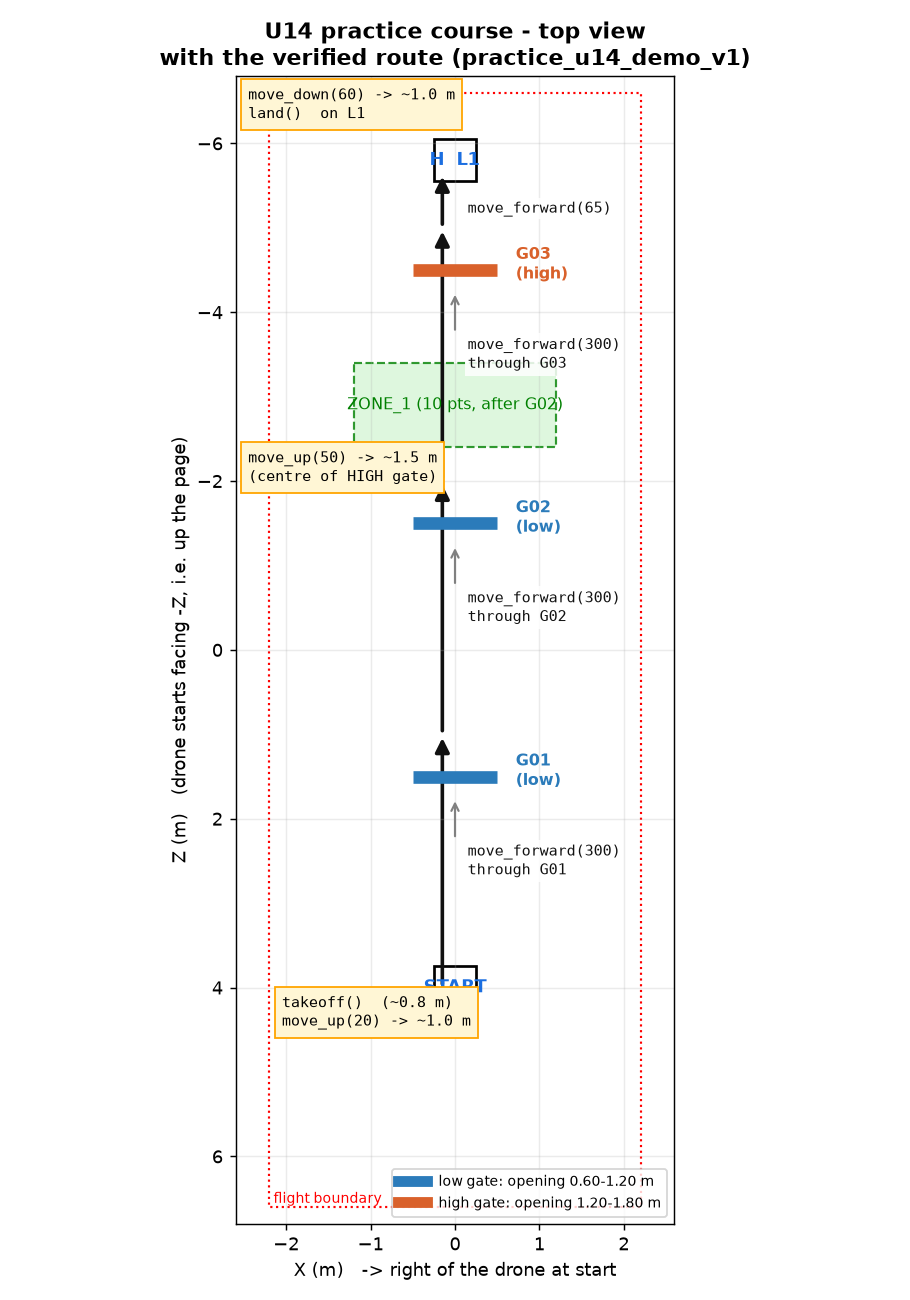
Top view of the U14 practice course: START at z = 4, three gates on a straight line, the "H" landing pad L1 at
z = −5.8. The arrows are the commands of base_u14.py.
- START pad (0, 0, 4.0), the drone faces −Z (up the page).
- G01 low at z = 1.5, G02 low at z = −1.5, G03 high at z = −4.5, all facing you.
- ZONE_1 (10 points) between the 2nd and 3rd gate; landing pad L1 (the H) at z = −5.8, 0.5 × 0.5 m.
- Landing target is fixed: L1.
U19 practice (configs/stages/practice_u19_demo_v1.json)
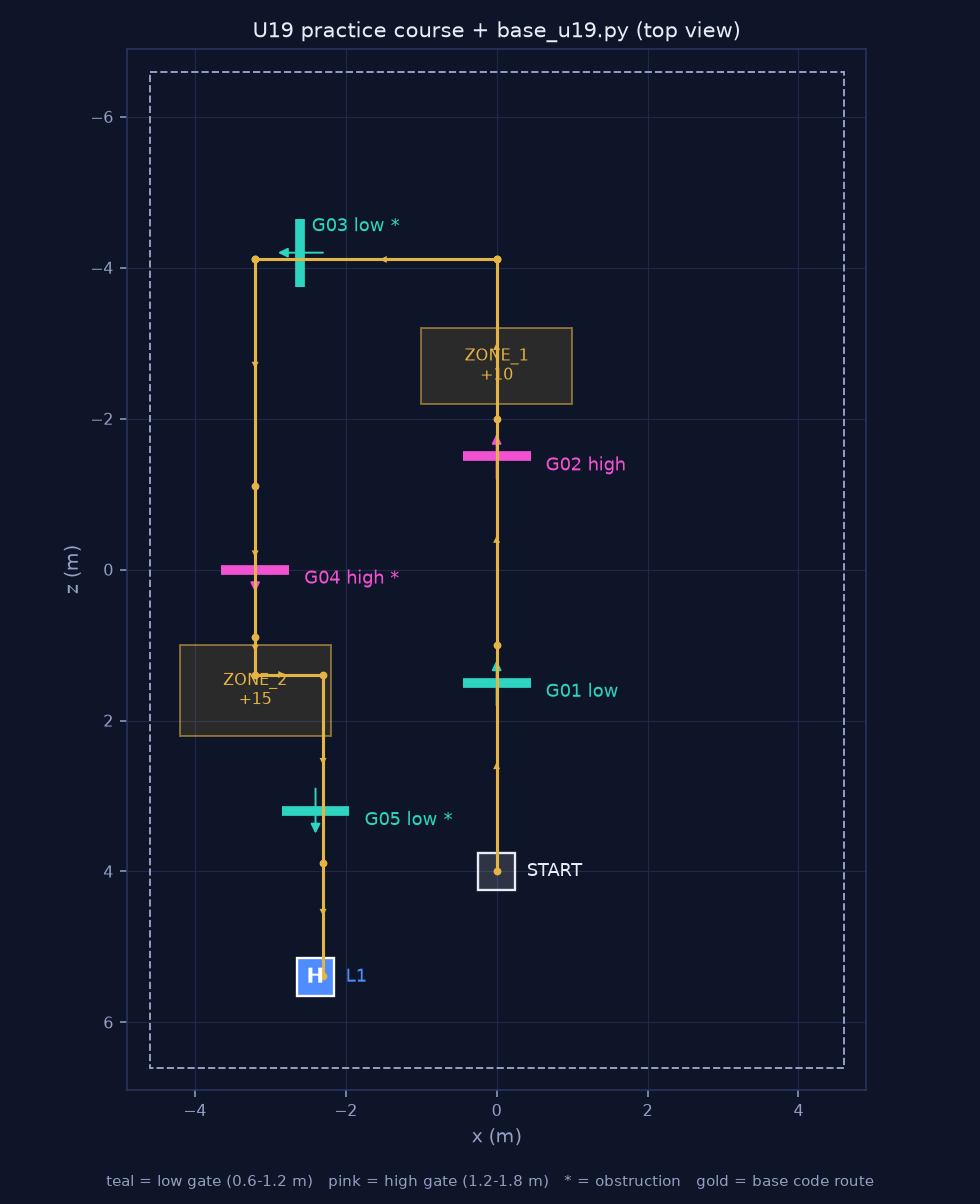
Top view of the U19 practice course: five gates (G03–G05 are turned and narrowed), two zones, and the single
"H" landing pad L1 at (−2.4, 5.4), 2.2 m past the exit side of the last gate G05. Dashed = return legs of base_u19.py (untested). (Diagram still shows the old pad position behind START.)
- G01 low, G02 high on the same line as U14; then G03 (low, turned 90°), G04 (high, 180°), G05 (low, 180°, exit toward +Z).
- ZONE_1 = 10 points (after G02), ZONE_2 = 15 points (after G04).
- Every course has exactly one H landing pad, placed after the last gate (on its exit side, ≥ 1 m past
it and closer to that gate than to START); the start square has no H and the pad is never at the start. In
this practice course L1 is at (−2.4, 0, 5.4), 2.2 m past G05, and it is fixed and announced before takeoff
(
FIXED_ANNOUNCED). The simulator and the Map Creator reject manifests that break this rule. - Official U19 stages may instead announce the target pad only after takeoff (
PAD_SELECTEDevent, the pad's border light strip turns green) – then the camera has to find it.
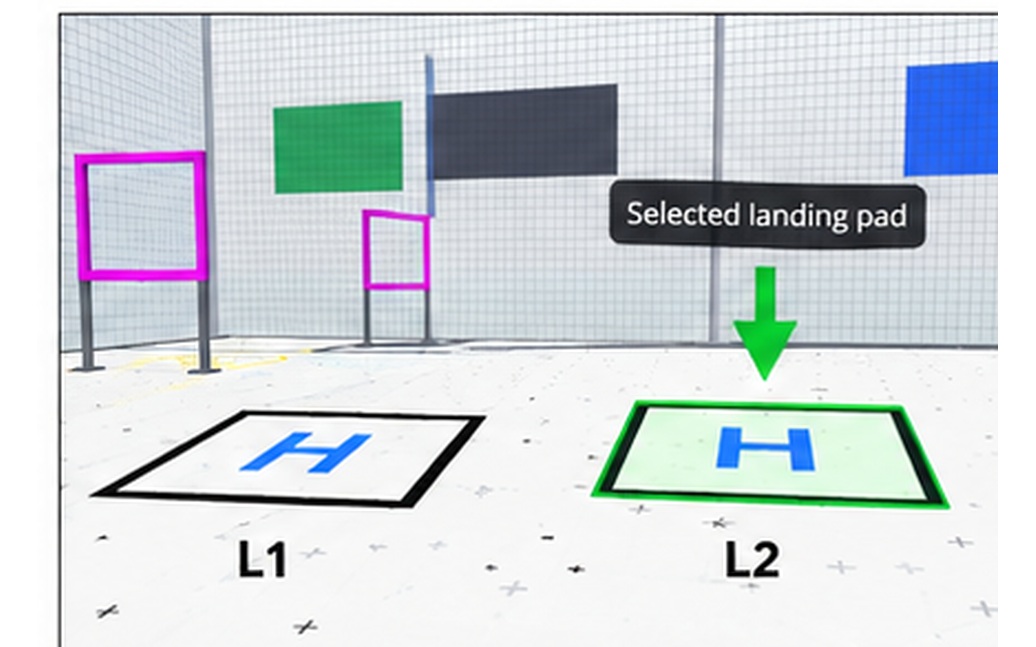
Reference picture: an announced landing pad has a lit (green) border strip.
Gate geometry
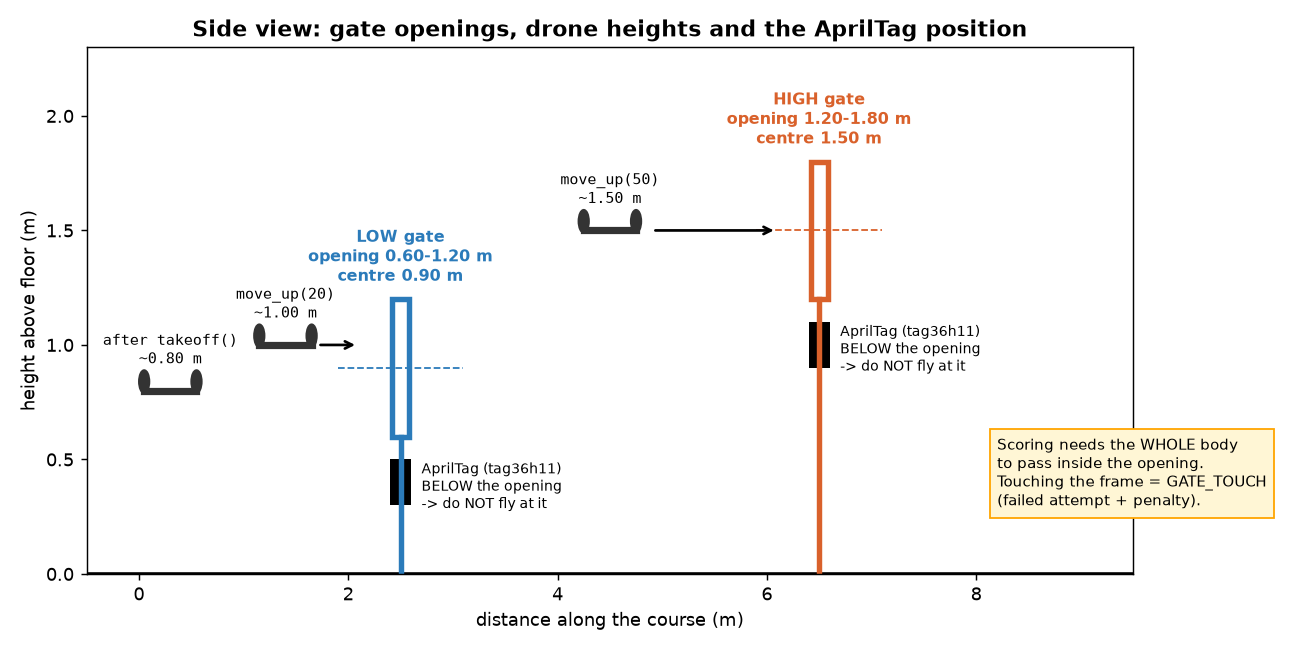
Side view: a low gate opening spans 0.60–1.20 m (centre 0.90 m), a high gate 1.20–1.80 m (centre 1.50 m).
After takeoff() the drone hovers at ≈ 0.80 m. The AprilTag is BELOW the opening – never fly toward the tag.
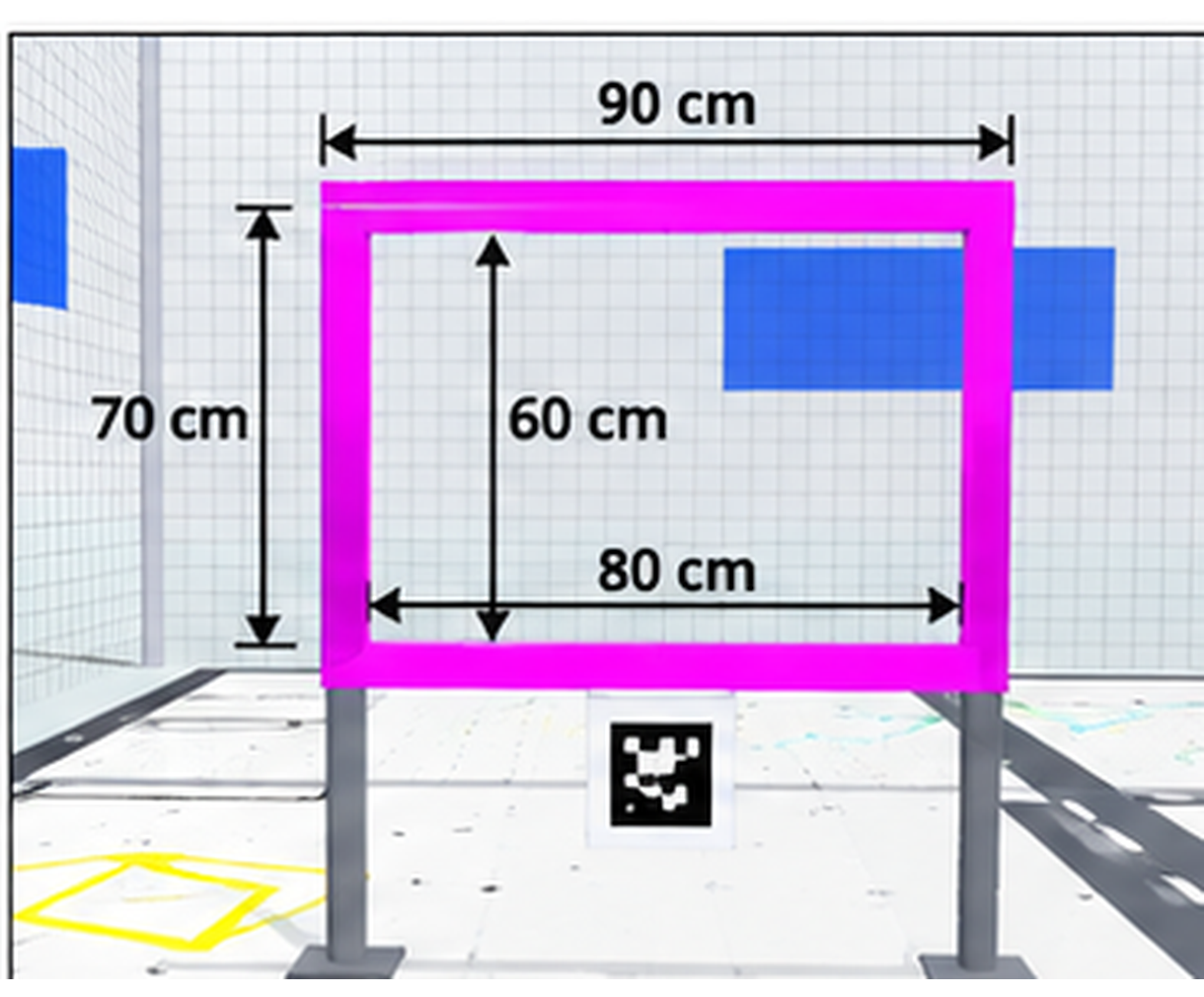
Reference: gate dimensions from the competition drawing.
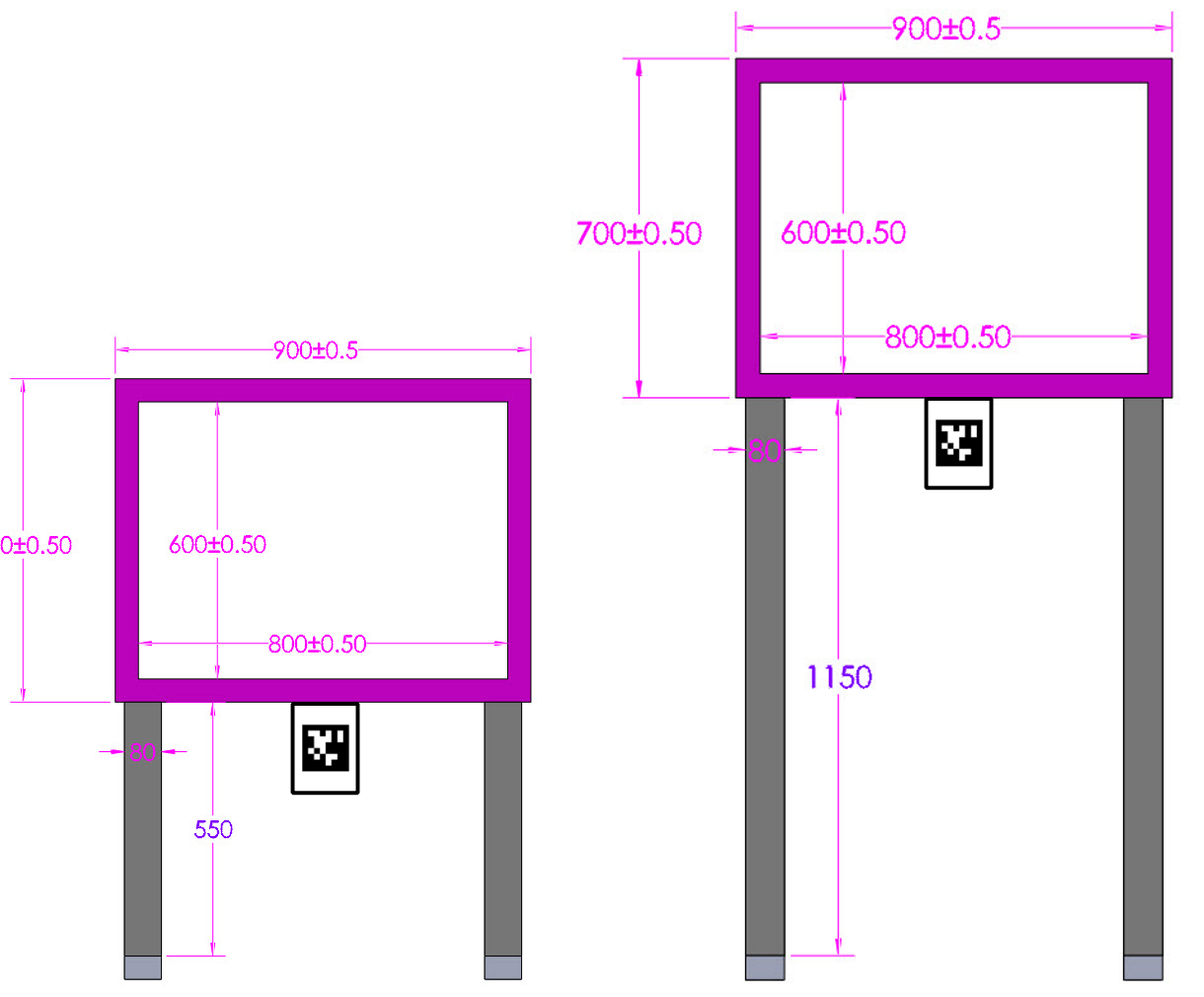
Reference: the physical gate dimension drawing the simulator gates follow.
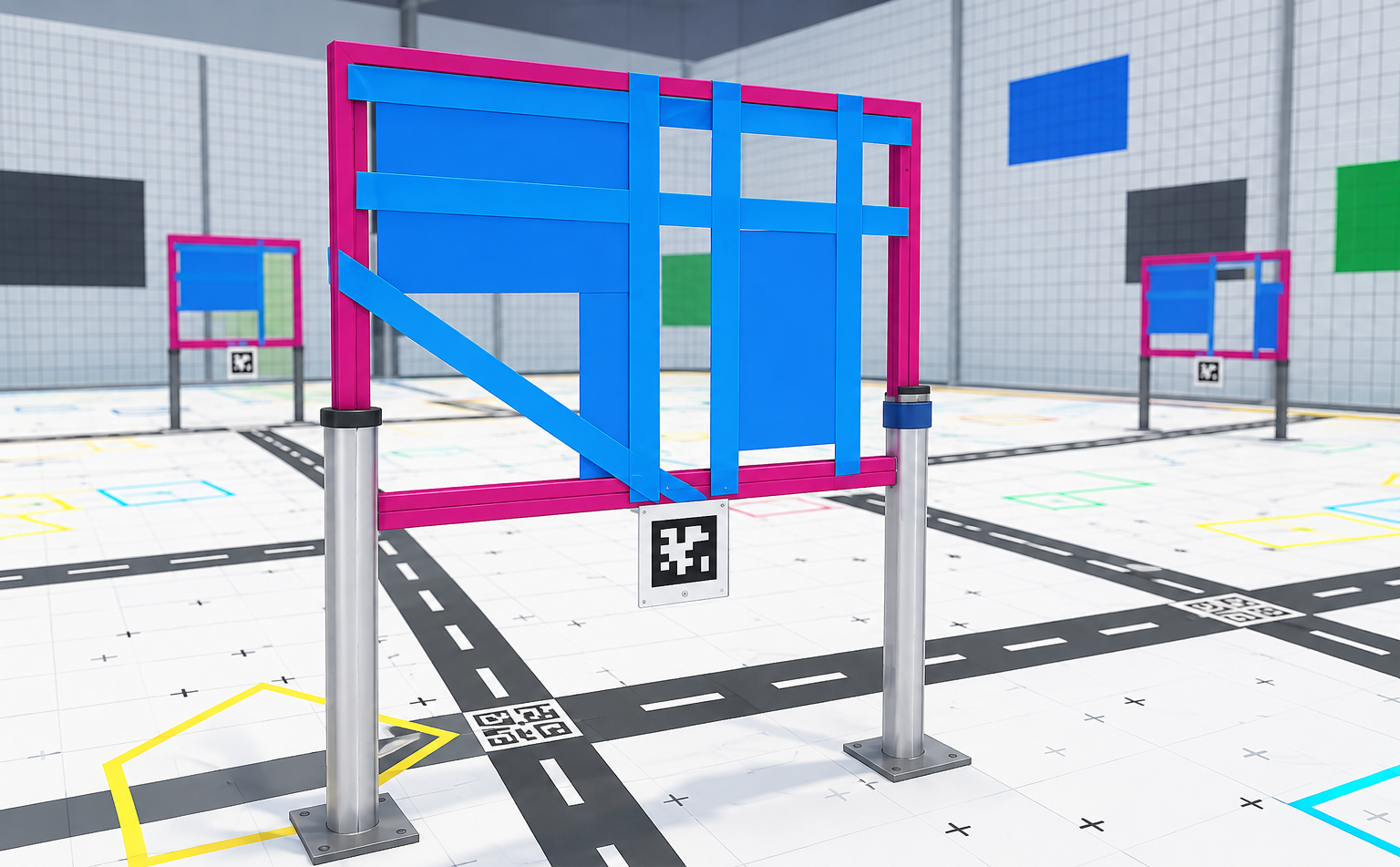
Reference: U19 gates G03–G05 are "narrowed" by a strip, a panel or a diagonal bar inside the opening.
What the drone camera sees
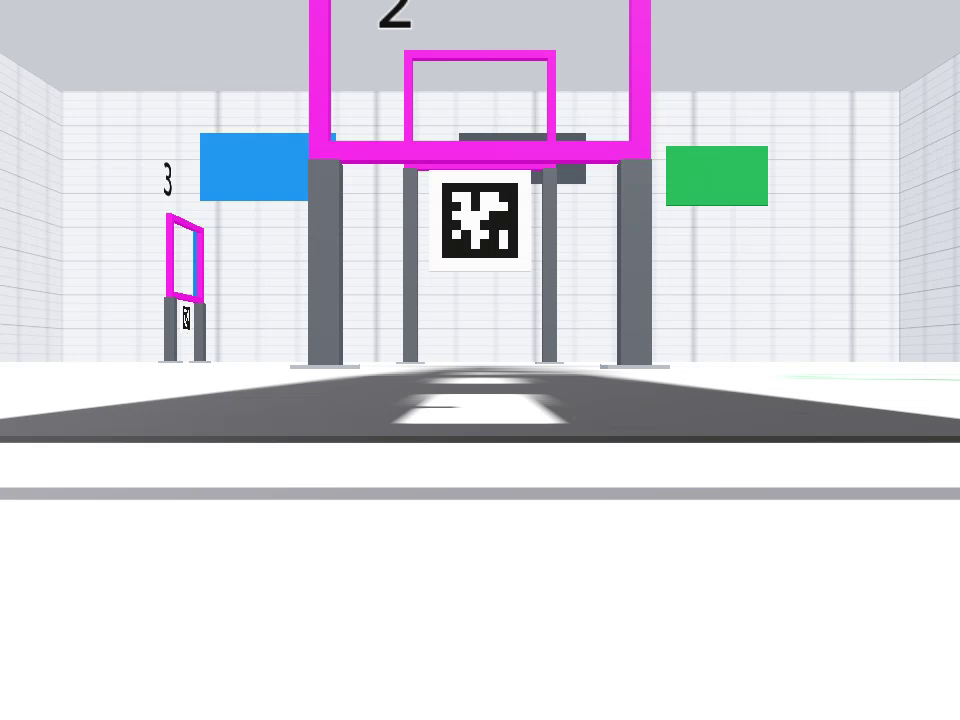
Real onboard frame (960 × 720) taken on the START pad: G01 ahead with its AprilTag below the opening.
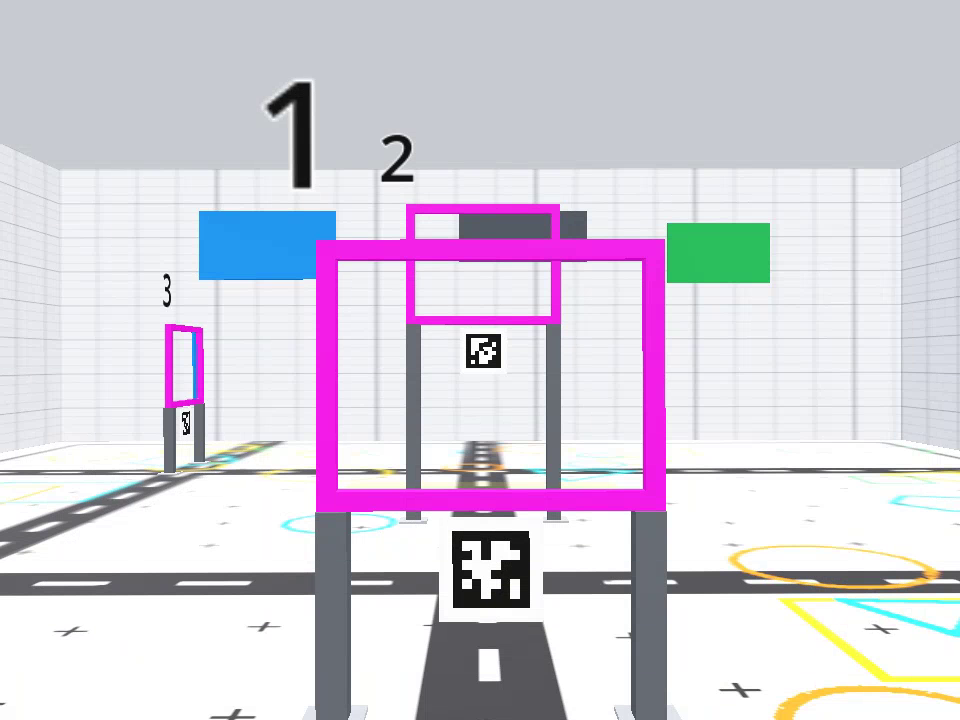
Onboard frame right after takeoff (≈ 0.8 m): the low gate opening is now in front of the camera.
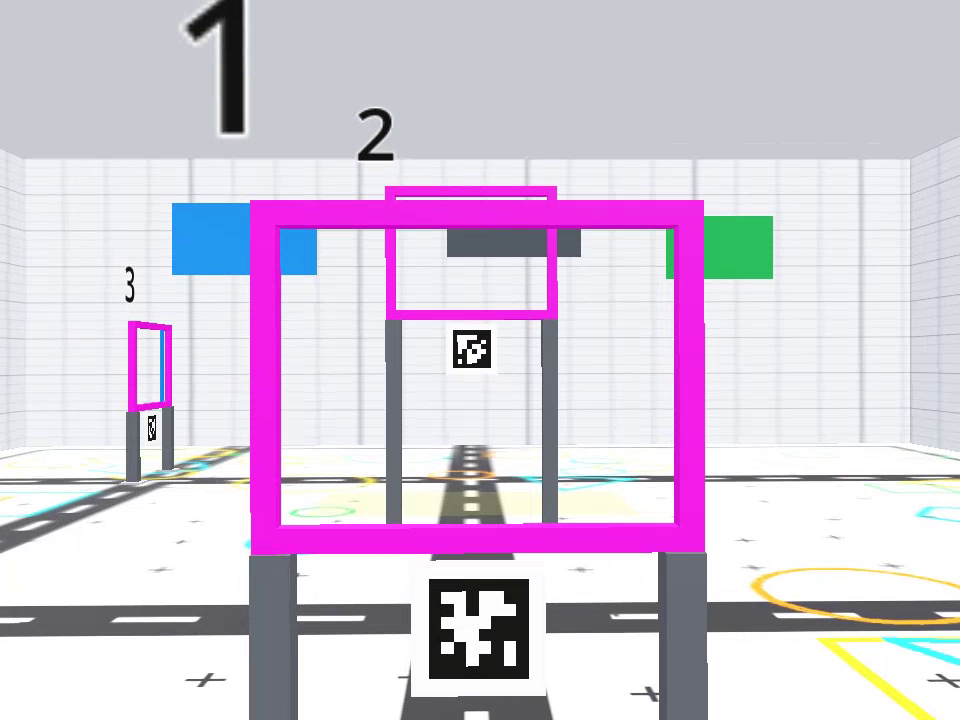
Onboard frame close to G01: the tag sits on the post under the rim; the opening is the magenta frame above it.
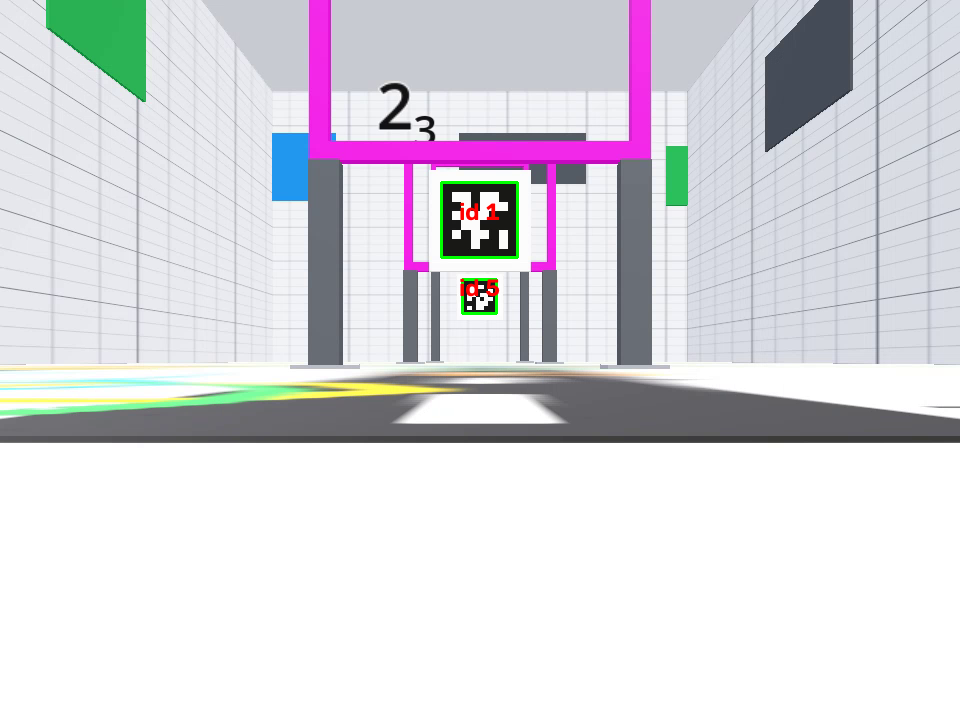
examples/camera_apriltag_viewer.py drawing the detected tag36h11 ids (1 and 5) from the start pad.
4. The commands, one by one
All of these are methods of djitellopy.Tello. Movement commands block until the drone answers ok
(DJITelloPy waits up to 7 s). Units: centimetres, degrees, percent.
| method | what the robot does | units / range |
|---|---|---|
Tello() |
creates the client (address 192.168.10.1, UDP 8889) – nothing is sent yet | – |
connect() |
sends command: enables SDK mode. Raises if there is no reply |
– |
get_battery() |
battery level | % (0–100) |
get_height() |
height above the take-off point, from the state stream | cm |
get_distance_tof() |
downward time-of-flight distance to the floor | cm |
get_yaw() |
heading relative to the heading at power-on | degrees, −180..180 |
takeoff() |
motors on, climbs and hovers at ≈ 80 cm | – |
move_forward(x) / move_back(x) |
flies straight in the body axis, then hovers | cm, 20–500 |
move_left(x) / move_right(x) |
sideways | cm, 20–500 |
move_up(x) / move_down(x) |
vertical | cm, 20–500 |
rotate_clockwise(d) / rotate_counter_clockwise(d) |
turns on the spot | degrees, 1–360 |
set_speed(s) |
cruise speed used by the move_* commands |
cm/s, 10–100 |
send_rc_control(lr, fb, ud, yaw) |
virtual joystick, see below | each −100..100 |
streamon() / streamoff() |
starts / stops the camera stream (UDP 11111) | – |
get_frame_read().frame |
latest decoded frame as a NumPy array RGB, 720 × 960 × 3 (None before the first frame) |
– |
land() |
descends and stops the motors | – |
end() |
lands if still flying, stops video, closes sockets. Always call it in finally |
– |
Values outside the range raise an exception in DJITelloPy before anything is sent, exactly like the real drone. A move longer than ≈ 300 cm may exceed DJITelloPy's 7 s reply timeout – split it.
send_rc_control – the joystick
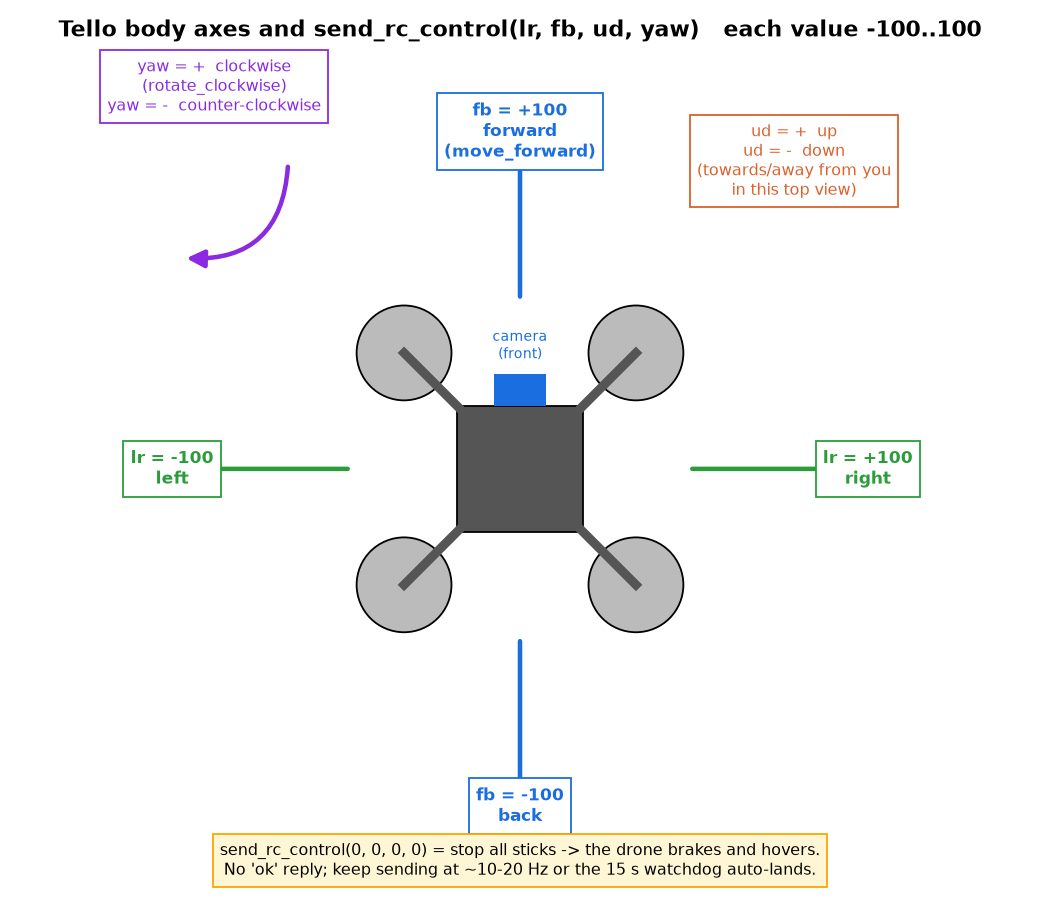
Body axes: fb + = forward (camera direction), lr + = right, ud + = up, yaw + = clockwise.
- Four values from −100 to 100:
lr(left/right),fb(back/forward),ud(down/up),yaw(ccw/cw). - The drone does not reply – the call returns immediately.
- The command is a stick position, so you must resend it regularly (10–20 times per second) from a loop. If the drone hears nothing for 15 s it lands by itself (watchdog).
send_rc_control(0, 0, 0, 0)= all sticks centred: the drone brakes and hovers. Send it before anymove_*command and beforeland().- Use it for closed-loop control from the camera (see
examples/base_vision_template.py).
Minimal program
from djitellopy import Tello

t = Tello()
t.connect()
print(t.get_battery(), "%", t.get_height(), "cm", t.get_distance_tof(), "cm")
t.takeoff()            # ~80 cm
t.move_up(20)          # ~100 cm
t.move_forward(100)    # 1 m straight ahead
t.rotate_clockwise(90)
t.land()
t.end()
Tello sensors and how to read them (~15 minutes)
A Tello flies "blind" unless your program asks it questions. Every sensor below is a real part on the
real drone, and the simulator models the same part with the same units (godot/scripts/physics/tello_sensors.gd),
so what you learn here works on hardware too.
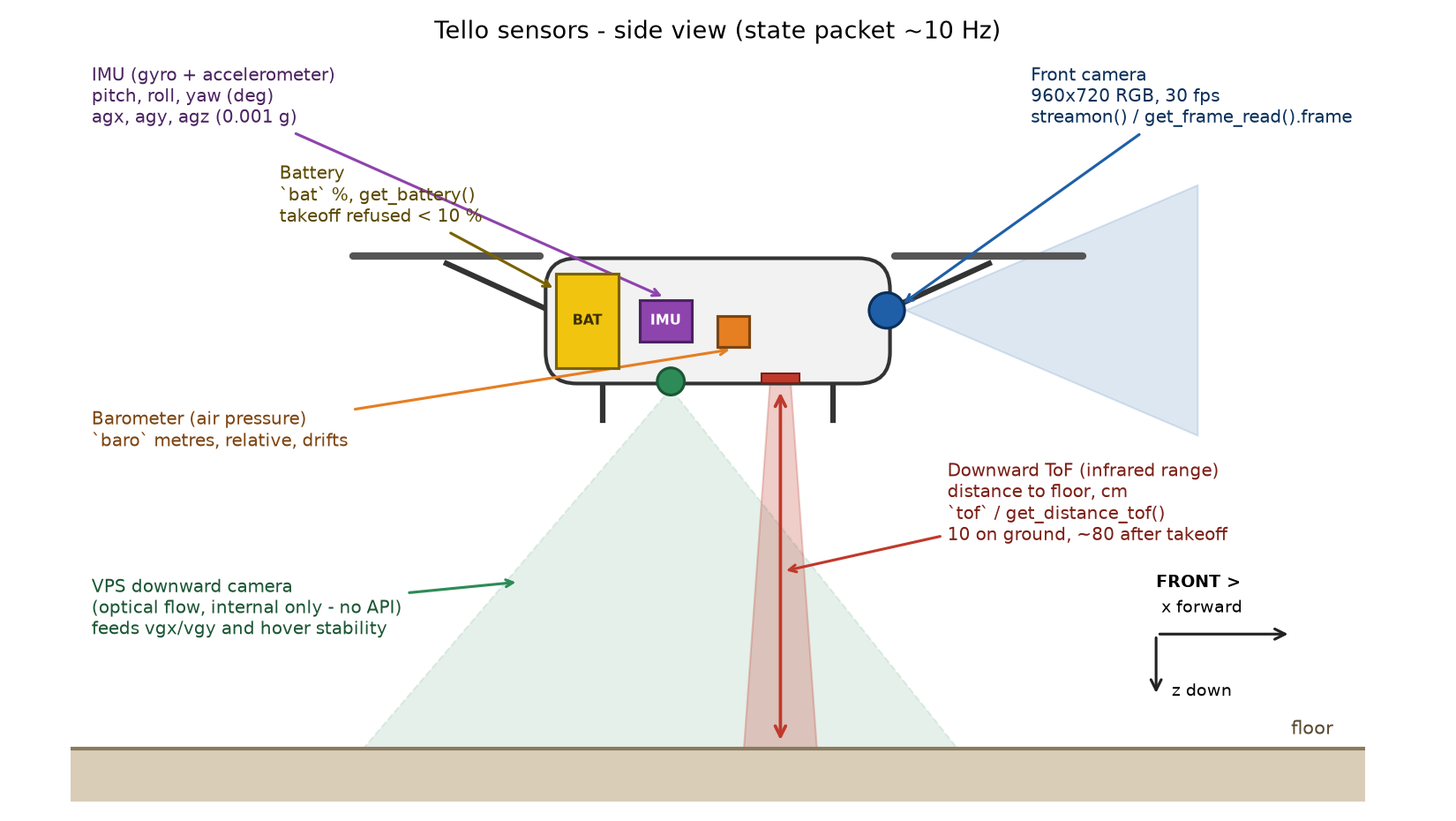
Side view of a Tello with its sensors. Front camera (blue) looks forward, the ToF range finder (red) sends a narrow infrared beam straight down, the VPS camera (green) watches a wide patch of floor, IMU and barometer are inside the body, the battery is at the back. Body axes: x forward, y right, z down.
How the values reach you. The drone broadcasts one text line about 10 times per second (~10 Hz) on UDP
port 8890. DJITelloPy stores the last line and every get_*() method below just reads one field from it, so those calls
return instantly and may be up to ~100 ms old. The query_*() methods send a question (battery?, tof?, ...) and
wait for the reply, so they are slower but fresh. For beginners: use get_*() inside loops, query_*() only once
in a while.
A real line, recorded from the simulator on the ground (artifacts/test_reports/phase1_raw_wire.json, state_sample):
pitch:0;roll:0;yaw:0;vgx:-2;vgy:-1;vgz:0;templ:48;temph:51;tof:10;h:0;bat:95;baro:31.04;time:0;agx:-2.59;agy:-2.62;agz:-995.33;
get_current_state() gives you that line as a Python dictionary:
s = t.get_current_state()
print(s["tof"], s["h"], s["bat"], s["yaw"])   # e.g. 10 0 95 0
The snippets below assume t is a connected Tello() and that you have import time at the top.
1. Downward range sensor (ToF / infrared)
- The part: a tiny infrared time-of-flight chip under the belly. It sends a light pulse down and times the echo.
- Measures: straight-line distance from the belly to whatever is under the drone (floor, a table, a mat).
- Unit: centimetres (int) in the state (
tof); the wire reply totof?is in millimetres (930mm), which DJITelloPy'squery_distance_tof()converts to a float in cm (93.0). - Typical values: 10 while sitting on the floor (the sensor is ~10 cm above the ground and never reports less),
~80–95 after
takeoff(), grows as youmove_up. Above about 4 m or over nothing (e.g. flying off a table edge) it returns the invalid code 6553 – always check for it. - Python:
get_distance_tof()(state, cm),query_distance_tof()(slow, float cm).
d = t.get_distance_tof()          # cm
if d == 6553:
    print("no echo - too high or nothing below")
elif d < 60:
    t.move_up(30)                 # climb if the floor is closer than 60 cm
2. Barometer
- The part: an air-pressure chip inside the body. Higher altitude = slightly lower pressure.
- Measures: altitude derived from pressure. It is relative (the starting number means nothing by itself) and it drifts slowly by tens of centimetres over minutes, like a real barometer in a warm room.
- Unit: the wire field
barois in metres (float, e.g.31.04). DJITelloPy'sget_barometer()multiplies by 100 and gives cm (e.g.3104.0);query_barometer()returns an int in cm (3100). - Typical values: ~31.0 m on the ground, ~31.9 m hovering at 80 cm (
phase2_correlations.json: ground31.06, hover31.93). - Python:
get_barometer().
base = t.get_barometer()          # cm, before take-off
t.takeoff()
print("climbed about", t.get_barometer() - base, "cm by barometer")   # ~ 80-90, noisy
Use it only for differences, never for an absolute height. Prefer tof / h indoors.
3. Fused height h
- The part: not a sensor – a number the flight controller computes by combining the ToF reading and the barometer's vertical speed.
- Measures: height above the take-off point.
- Unit: centimetres (int). 0 on the ground (the controller resets it), ~80–85 after take-off
(
phase2_correlations.json: groundh:0, tof:10; hoverh:83, tof:93– note h ≈ tof − 10). - Python:
get_height()(state),query_height()(slow).
t.takeoff()
while t.get_height() < 100:       # climb to 1 m, then stop
    t.send_rc_control(0, 0, 30, 0)
    time.sleep(0.05)
t.send_rc_control(0, 0, 0, 0)
4. IMU – gyroscope and attitude (pitch, roll, yaw)
- The part: the Inertial Measurement Unit – a chip with a 3-axis gyroscope (rotation speed) and a 3-axis accelerometer. It sits on the main board in the middle of the body.
- Measures: the drone's orientation.
pitch= nose up/down (negative nose-down when flying forward: the evidence file showspitch:-5while moving at 47 cm/s),roll= tilt left/right,yaw= heading. - Unit: degrees (int), each in −180..180.
- Yaw details: 0 at power-on (whichever way the drone was facing), clockwise positive (seen from above),
wraps from 180 to −180.
rotate_clockwise(60)changed yaw by+59in the evidence (cw60_delta). The gyro integrates, so yaw drifts by a fraction of a degree per minute. - Python:
get_pitch(),get_roll(),get_yaw();query_attitude()returns{"pitch": 0, "roll": 0, "yaw": 0}in one reply.
start = t.get_yaw()
t.rotate_clockwise(90)
turned = (t.get_yaw() - start + 180) % 360 - 180   # handles the 180/-180 wrap
print("turned", turned, "deg")                     # ~ 90
5. IMU – accelerometer (agx, agy, agz)
- The part: the accelerometer half of the same IMU.
- Measures: acceleration in the body frame (x forward, y right, z down), including gravity.
- Unit: about 0.001 g (milli-g, float). At rest
agz≈ −1000 (that is gravity, 1 g, pointing "up" in a z-down frame);agx,agynear 0 with a few units of noise. Forward acceleration shows as a negativeagx(phase2_correlations.jsonmoving:agx:-32.01). - Python:
get_acceleration_x(),get_acceleration_y(),get_acceleration_z().
ax, ay, az = t.get_acceleration_x(), t.get_acceleration_y(), t.get_acceleration_z()
print(f"{ax:.0f} {ay:.0f} {az:.0f} milli-g")       # e.g. -1  2  -999 at rest
if abs(az) < 800:
    print("strong tilt or free fall")
6. Velocity estimate (vgx, vgy, vgz)
- The part: not one chip – the flight controller fuses the downward VPS camera (optical flow: how fast the floor texture slides under the drone) with the IMU.
- Measures: speed in the body frame:
vgxforward,vgyright,vgzdown. - Unit: cm/s (int). Hovering shows noise of ±2 (
vgx:1;vgy:-1;vgz:1in the hover sample); flying forward withsend_rc_control(0, 50, 0, 0)givesvgxaround 45–50. - Python:
get_speed_x(),get_speed_y(),get_speed_z().
t.send_rc_control(0, 50, 0, 0)
time.sleep(1.0)
print("forward speed", t.get_speed_x(), "cm/s")    # ~ 47
t.send_rc_control(0, 0, 0, 0)                      # brake
7. Downward VPS camera (internal only)
- The part: a small low-resolution camera next to the ToF sensor, looking straight down (the green cone in the
diagram). The standard Tello gives you no frames and no API for it –
downvision/mission-pad commands answerunknown command. - Why you still care: it is what keeps the drone from sliding while hovering. It needs visible texture on the
floor. Over a plain white, glossy, or dark floor, or in dim light, the optical flow has nothing to track,
the controller falls back to the IMU, and the drone drifts sideways by tens of centimetres (the simulator
reproduces this:
phase2_vps_coupling.jsonmeasured 2.5 cm drift on a textured floor vs 7.97 cm on a uniform one). The competition mats are textured for exactly this reason. - Tip: if a hover drifts, do not fight it with blind
move_*commands – correct from what the front camera sees.
8. Battery
- The part: the removable 1.1 Ah LiPo pack at the back.
- Measures: remaining charge in percent (int, 0..100).
- Rules:
takeoff()is refused below 10 %;flip_*is refused below 50 %. A full pack lasts about 13 minutes of hover; charge drops ~1 % every 10–15 s in flight (phase2_correlations.json: 95 % → 92 % after 20 s of motors). - Python:
get_battery()(state),query_battery()(slow).
if t.get_battery() < 20:
    raise SystemExit("charge first")
t.takeoff()
9. Temperature
- The part: the thermometer on the main board; the motors and Wi-Fi chip warm it.
- Measures: board temperature as a low and a high reading, °C (int). ~48–52 on the ground, rising towards 70 in a long flight; the drone shuts down when it overheats, so let it cool between runs.
- Python:
get_temperature()returns the mean of the two;get_lowest_temperature()/get_highest_temperature()givetempl/temph;query_temperature()is the slow form.
print(t.get_temperature(), "C") # e.g. 49.5
10. Motor time
- Measures: seconds the motors have been spinning since power-on (
time, int, s). 0 before the first take-off, it keeps counting across landings. - Python:
get_flight_time(),query_flight_time().
t.takeoff(); time.sleep(3)
print("motors ran", t.get_flight_time(), "s")      # ~ 3 or 4
11. Front camera
- The part: the fixed forward camera in the nose (blue in the diagram). No gimbal: when the drone pitches forward the picture tilts down.
- Delivers: H.264 video on UDP 11111, decoded by DJITelloPy to a NumPy array of 720 rows × 960 columns × 3 (RGB), at up to 30 fps.
- Python:
streamon()once, thenget_frame_read().frameas often as you like (it isNoneuntil the first frame arrives, usually within a second).
t.streamon()
fr = t.get_frame_read()
while fr.frame is None:
    time.sleep(0.05)
h, w, _ = fr.frame.shape            # 720 960 3
print(fr.frame[360, 480])           # RGB of the centre pixel
12. Wi-Fi signal
- Measures: signal-to-noise ratio of the link, int (higher is better; ~90 in the simulator, real drones fall to
30–50 before video stutters). Query only:
query_wifi_signal_noise_ratio()returns a string such as"90".
Ground vs hover: the numbers side by side
From artifacts/test_reports/phase2_correlations.json (one run, same drone):
| field | on the ground | hovering after takeoff() |
moving forward (rc fb=50) |
|---|---|---|---|
tof (cm) |
10 | 93 | 93 |
h (cm) |
0 | 83 | 82 |
baro (m) |
31.06 | 31.93 | 31.95 |
pitch / yaw (deg) |
0 / 0 | 0 / 0 | −5 / 60 |
vgx (cm/s) |
−2 | 1 | 47 |
agz (0.001 g) |
−999 | −1002 | −988 |
bat (%) |
95 | 95 | 95 |
time (s) |
0 | 3 | 5 |
Which sensor for which task
| task | use | not |
|---|---|---|
| line up with a gate | front camera (get_frame_read().frame) – the gate position in the image |
vgx/vgy (they tell speed, not where the gate is) |
| hold or change height | get_distance_tof() / get_height() with send_rc_control(0,0,ud,0) |
get_barometer() (drifts) |
| turn by a known angle | get_yaw() before/after, or rotate_clockwise() |
the camera alone |
| stop / brake | send_rc_control(0, 0, 0, 0) and wait until get_speed_x() is near 0 |
a move_back "counter-move" |
| detect a drifting hover | get_speed_x(), get_speed_y() not 0 while sticks are centred |
– |
| decide whether to fly at all | get_battery() ≥ 20, get_temperature() < 65 |
– |
| know you are on the ground | get_height() == 0 and get_distance_tof() == 10 |
baro |
5. Fly the U14 course now
python examples\base_u14.py
The file contains the route as a list of (command, value) with a comment per line. The route is the one
verified in artifacts/demo/RESULT.md:
up 20 → forward 300 (G01) → forward 300 (G02) → up 50 → forward 300 (G03) → forward 65 → down 60 → land
Result of the verified run: GATE_VALID G01, G02, G03, LANDING_VALID L1, ATTEMPT_SUCCEEDED. Note that
open-loop flight drifts about ± 0.3 m over the 10 m route, so the landing is not guaranteed every run –
one of two clean runs overshot by 0.29 m. Improving this (telemetry, camera) is your job.
For U19 start with examples\base_u19.py: gates G01 + G02 + ZONE_1 are the published demo route
(up 20, forward 300, up 50, forward 300, forward 70); the return to the H pad
(rotate_clockwise 180, forward 300, forward 300, forward 100, down 60, forward 50, land) is a
starting point only – untested.
6. Refereeing rules (as implemented in the simulator)
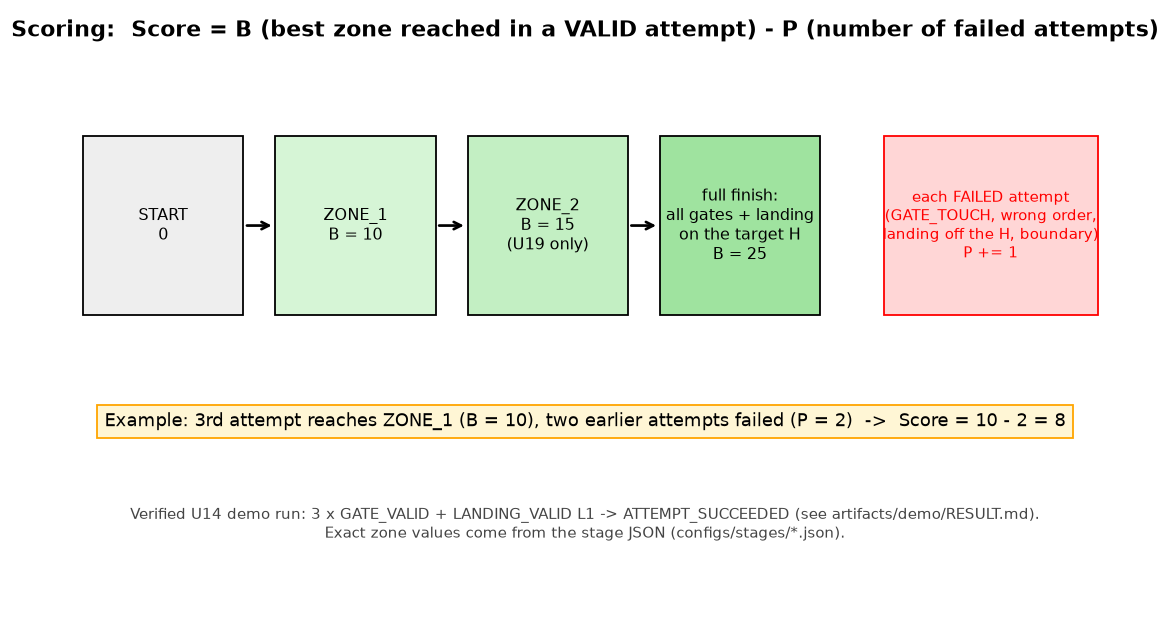
Score = B (best zone reached in a valid attempt) − P (number of failed attempts); a full finish is worth 25.
- A gate counts (
GATE_VALID) only when the whole drone body passes through the opening, from the approach side, and in the required order (G01, then G02, …). - Touching a gate frame or obstacle →
GATE_TOUCH→ the attempt fails and one penalty point is added. Leaving the flight boundary (BOUNDARY_EXIT) also fails the attempt. - Landing is valid (
LANDING_VALID) only when the drone stops fully inside the announced H pad (0.5 × 0.5 m). OtherwiseLANDING_INVALID(e.g.PAD_FOOTPRINT_OUTSIDE). - Zones give points once the required gates were passed (
ZONE_VALID: 10 for ZONE_1, 15 for ZONE_2 in U19). - Score = best zone value B − penalties P; completing all gates and landing on the target pad = 25.
- A session lasts 900 s; the drone's battery starts at 96 %.
Reading the referee panel
Press Esc in the arena to open the referee panel / event log. The events you will see:
| event | meaning |
|---|---|
PAD_SELECTED |
the target landing pad was announced (official U19 stages may do this after takeoff) |
GATE_VALID G0x |
gate passed correctly |
GATE_TOUCH G0x:rim |
you hit the frame → attempt failed, +1 penalty |
ZONE_ENTER / ZONE_VALID |
you entered a scoring zone / it counted |
LANDING_VALID L1 |
landed fully inside the target pad |
LANDING_INVALID … |
landed outside / partly outside |
ATTEMPT_SUCCEEDED / ATTEMPT_FAILED |
final verdict of the attempt |
BOUNDARY_EXIT |
you left the arena flight volume |
INFRASTRUCTURE_OVERLOAD |
the PC is too slow; results of that run are not reliable |
7. Common problems
| symptom | cause / fix |
|---|---|
connect() raises "Did not receive a response" / timeout |
simulator not in the arena yet; 192.168.10.1 missing (run tools\setup_network.ps1); firewall; another program already controls the drone |
reply is error |
command refused: value out of range, a move while not flying, takeoff while already flying, battery too low; U19 forward 300 returning error has been seen when two simulators shared the port |
| "Cannot bind UDP 192.168.10.1:8889" (simulator) | address missing or another simulator instance is running – close it; a second instance also makes the replies echo back ("up 50" instead of "ok") |
KeyError / weird reply inside DJITelloPy |
a late reply from a previous command on an overloaded PC; close other apps, lower graphics |
no video (frame stays None) |
wait 2–3 s after streamon(); check av is installed, ffmpeg available, firewall rule for UDP 11111; the first frame may be 400 × 300 before 960 × 720 |
| drone lands by itself | 15 s without any command (watchdog) – send something, e.g. get_battery() or send_rc_control |
run tools\doctor.py on the simulator PC |
prints network and port diagnostics |
8. Map Creator (your own courses)
On the category selection screen press M to open the Map Creator. Saved maps go to
%APPDATA%\Godot\app_userdata\FIRA Air Simulator\stages\
and appear in the course list next to the shipped practice courses. The shipped JSON files in
configs/stages/ are the reference for the format (units in metres, gate height_config low/high).
9. Spectator camera angles
Press C in the arena to cycle, or click the buttons at the bottom of the screen: Follow Smooth, Chase Low, Orbit Free, Gate Focus, Trackside, Overhead, Crane/Dolly, Landing Focus, Auto Director, True Tello FPV. Drag / mouse wheel orbit the camera in Orbit mode. "True Tello FPV" shows the same picture your program receives.
10. Where to go next
examples/base_vision_template.py– skeleton: detect the AprilTag, align withsend_rc_control, climb above the tag and fly through (untested gains, tune them).examples/camera_apriltag_viewer.py– just look at the camera and the detected tags.final.pyin the project root – an advanced example of a complete vision-based run (AprilTag + HSV colour tracking). Read it after you understand the basics; it is not a beginner starting point.docs/student_quickstart.md– one-page summary.